
Online Compass – Your Reliable Guide to Find North
Welcome to Online Compass, the essential tool to help you find your way wherever you are! With our virtual compass, you can determine your direction in real time, without needing to install an app or carry a physical compass. Whether you’re hiking, traveling, or simply curious about your orientation, our online compass provides you with a quick, accurate, and easy-to-use solution. Navigate with complete ease.
Check more information here.
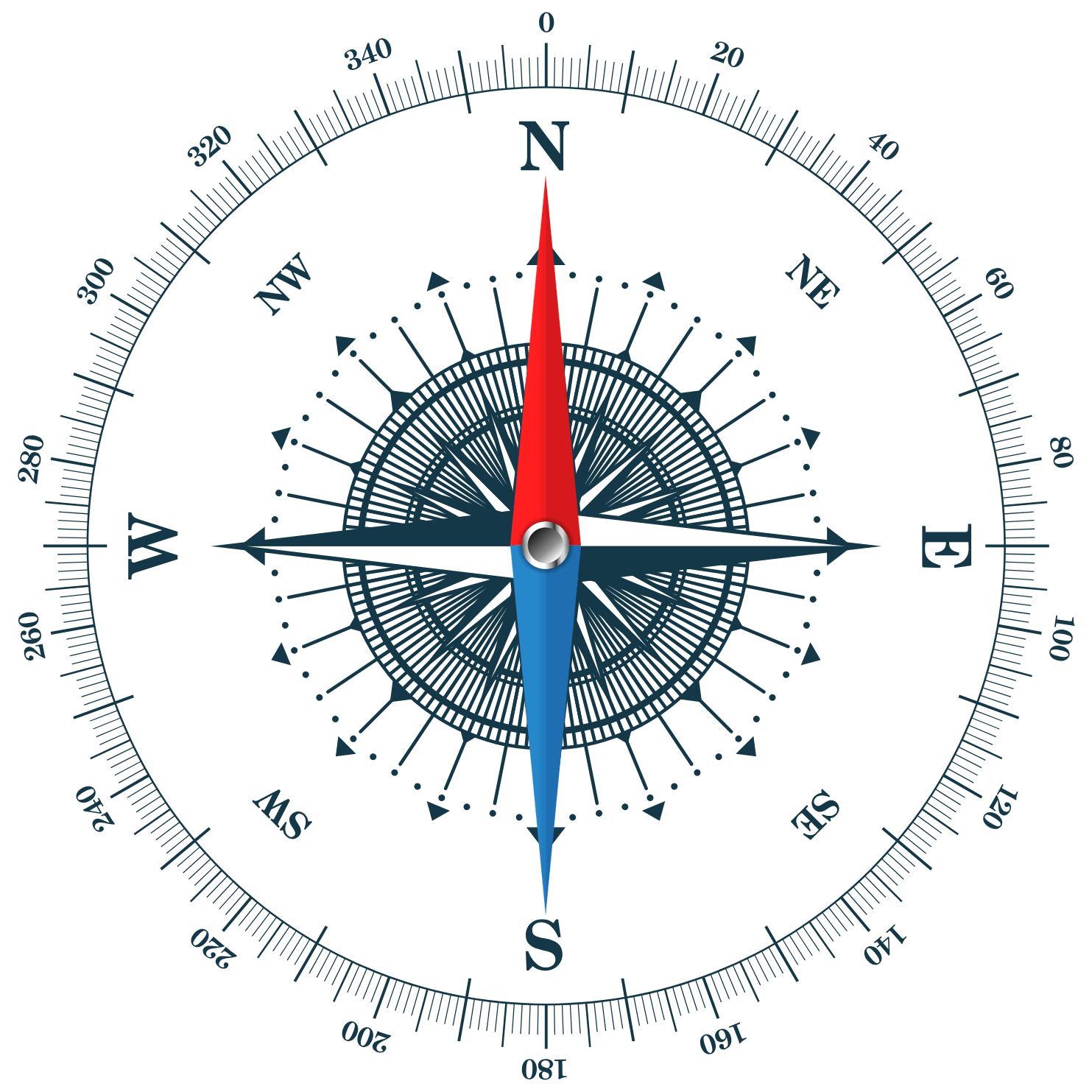
Sorry, your device does not support DeviceOrientation. Please follow the instructions below to enable the sensors, then refresh the page.
Localisation:
Open on map
Other Tools
The Online Compass is exactly what you imagine: a classic compass, but available online! Forget about digging through your drawers looking for a compass.
When geolocation becomes difficult due to a slow or nonexistent internet connection, this innovative solution could well become your best ally. But how does it really work, and what are its advantages?
Key Points:
- Universal Compatibility: Works on most modern devices, both Android and iOS, thanks to their built-in magnetometer.
- Offline Functionality: Once opened, this compass remains operational even without internet access. Handy for hikes in the wilderness.
- Directional Accuracy: Displays detailed information such as angle and direction.
- Map Location: Enable the location feature to see where you are on a map.
- Ease of Use: Simplified to the maximum; just open the web page and you’re ready to go!
Make sure your browser allows access to the necessary sensors.
We bet you’re eager to discover everything this online compass can do for you. Keep reading for a complete guide and tips to optimize its use.
What is the online compass?
The online compass is a practical digital solution that replaces traditional compasses. Designed to work in most modern browsers, it uses your device’s built-in magnetometer to determine orientation.
Once opened, it can work offline as long as you don’t close your browser or the tab containing this web page. This makes it ideal for areas where internet connection is slow or nonexistent.
It not only provides precise directions but also information such as angle and heading relative to the compass itself. You can also enable location to display your position on a map.
If some features don’t work correctly, a detailed troubleshooting guide is available below.
Advantages of using an online compass
Using an online compass has several significant advantages:
- Convenience: No need to carry a physical compass or install separate apps, making this tool easily accessible on your devices.
- Built-in Technology: Online compasses use the device’s built-in magnetometer to determine orientation, improving user experience.
- GPS Integration: Some advanced versions interface with GPS, offering enhanced navigation capabilities.
- Consistent Accuracy: Unlike traditional compasses with moving parts that can wear out, online compasses maintain accuracy thanks to the absence of mechanical components.
- Military Applications: Their reliability and accuracy make them suitable for military use.
How does an online compass work?
An online compass uses your device’s built-in magnetometer to detect magnetic fields and determine orientation. It then displays the cardinal directions (North, South, East, West) through a simple, intuitive digital interface. Some advanced versions also integrate GPS technology to provide location-based information.
Secure and with no moving parts, these compasses ensure consistent accuracy and are often preferred in demanding contexts such as military applications. Their lack of mechanical components also eliminates the possibility of wear over time.
Which devices can use this online compass?
| Device | Compatible Operating System |
|---|---|
| Smartphones | Android, iOS |
| Tablets | Android, iOS |
| Laptops/desktops | Windows, macOS |
Access to this compass is via a web browser; no need to install any specific app. Any device equipped with a magnetometer can use this technology effectively to provide accurate orientation.
Button: Compass Not Working? What to Do?
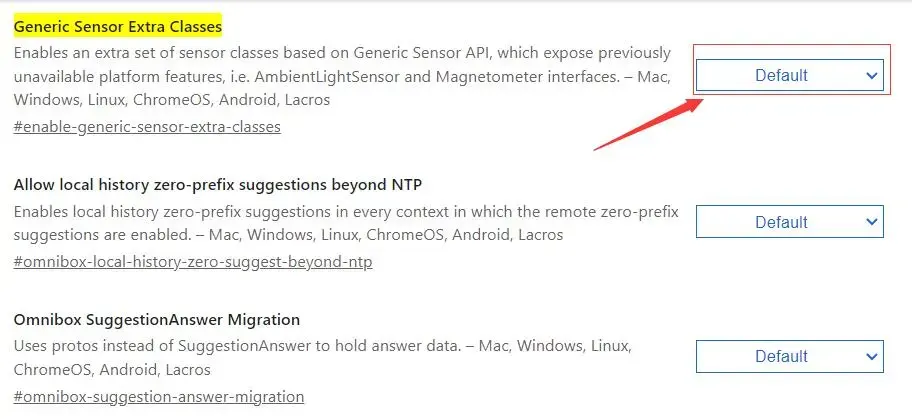
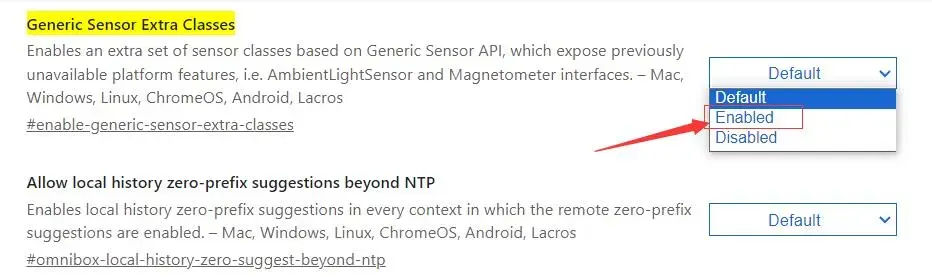
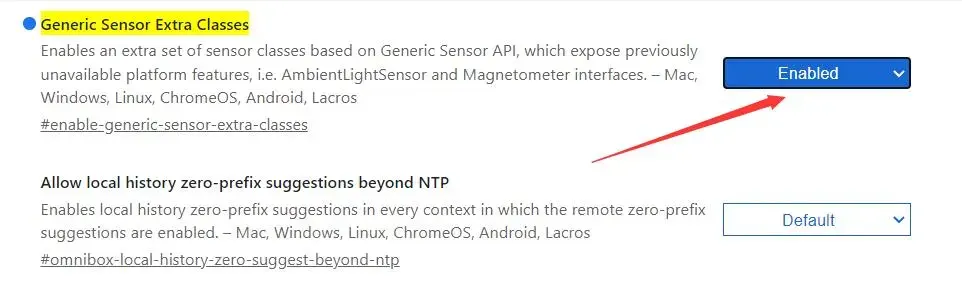
Configuration for Chrome:
- Copy and paste this link into a new tab:
chrome://flags/#enable-generic-sensor-extra-classes; - Set "Generic Sensor Extra Classes" to "Enabled";
- If using a version prior to Chrome 67: also enable "Generic Sensor." Finally, restart Chrome.
Configuration for Edge:
- Copy and paste this link into a new tab:
edge://flags/#enable-generic-sensor-extra-classes; - Set "Generic Sensor Extra Classes" to "Enabled";
- Finally, restart Edge.
Safari (iOS and macOS):
For Safari (iPhone & iPad):
- Go to Settings > Safari > Privacy & Security.
- Enable "Motion & Orientation Access."
For Mac:
- Safari > Preferences > Websites.
- Ensure that "Motion & Orientation Access" is enabled.
Is the Online Compass Accurate?
Yes, our digital compass was designed to be as accurate as possible.
However, its accuracy depends on the proper functioning of the magnetometer.
Regularly calibrating your device (figure-eight movement) improves accuracy.
If you see an error message, check your privacy settings.
How to Use This Online Compass?
Our application is very simple.
Just open this web page.
For most users, it works immediately.
If there’s no signal, check our settings guides.
Conclusion
In short, the Online Compass is revolutionizing orientation by making a practical and reliable digital compass accessible. No more rummaging through your drawers for a physical compass; this innovative solution is compatible with most modern devices thanks to their built-in magnetometer. Once opened, it even works without internet connection—perfect for outdoor adventures.
This digital compass offers remarkable accuracy, displaying detailed information such as angle and heading. In addition, it allows you to locate your position on a map, adding an extra layer of usefulness. Its use is simplified to the maximum: just open the dedicated web page and you’re ready to go.
For those encountering technical difficulties, troubleshooting guides are available to ensure optimal functionality on different browsers like Chrome, Edge, and Safari. By regularly calibrating your device, you can further improve the accuracy of this essential tool.
The Online Compass is not just a modern gadget; it’s a reliable companion for all your outdoor adventures—or even for navigating your urban daily life. So don’t hesitate to integrate this technology into your routine and enjoy orientation that’s always precise and accessible!
Recent Posts
Maîtrise de la Boussole d'Orientation - Comment Utiliser la Boussole de Course d'Orientation
Publicado en: at 01:35Apprenez à utiliser une boussole d'orientation pour naviguer en toute confiance lors de vos aventures en pleine nature. Découvrez comment reconnaître les pièces essentielles, ajuster la déclinaison, e... Seguir Leyendo
Quels Sont les Différents Types de Boussoles - Découvrez-les Tous!
Publicado en: at 00:25Découvrez l'univers fascinant des boussoles ! Que vous soyez un aventurier ou un marin chevronné, explorez les différents types de boussoles, du modèle magnétique classique au gyrocompas ultra-précis.... Seguir Leyendo
Quelle est l'Histoire de la Boussole? Découvrez son Épopée Fascinante.
Publicado en: at 18:35Découvrez l'évolution fascinante de la boussole, passée d'un outil divinatoire chinois à un instrument indispensable de navigation mondial. Explorez comment cette invention millénaire a révolutionné l... Seguir Leyendo
Maîtrisez l'Art de Se Repérer - Comment Naviguer Sans Boussole
Publicado en: at 20:55Découvrez des astuces de survie captivantes pour naviguer en pleine nature sans boussole grâce aux techniques naturelles et ancestrales de Jessie Krebs, experte en survie. Apprenez à utiliser le solei... Seguir Leyendo